8.11. Procedure to manage the `monx` capture interface settings
A - Introduction
This procedure describes:
Viewing the network settings
Modifying these parameters
For...
Use the command
carry out the procedures successively
obtain an overview of the information on all network interfaces
display the MTU value of the interfaces
modify the MTU value of the interfaces
Display the available capture interfaces
manage the available capture interfaces
B - Prerequisites
User: setup
Commands used in this procedure:
C - Preliminary operations
Connect to the GCap (refer to Procedure to remote connection to GCap via an SSH tunnel)
Stop the Sigflow detection engine (refer to monitoring-engine)
D - Procedure to display the network configuration
The command prompt is displayed.
(gcap-cli)
Enter the command
show interfaces
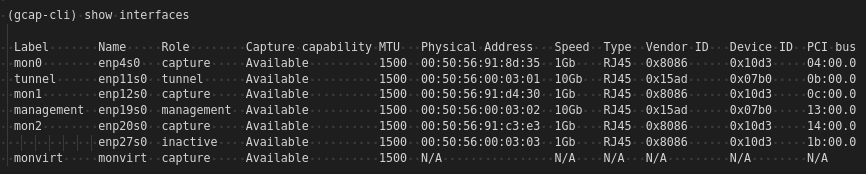
- ValidateThe system displays the information of all network interfaces
Note
The`mon0`,`mon1`,`mon2`interface is enabled ( field: role, value : capture )The`enp27s0`interface is disabled ( field: role, value : inactive)
E - Procedure to display or change the MTU value
The command prompt is displayed.
(gcap-cli)
To display the current configuration of enabled interfaces:
Enter the command
show interfaces
- ValidateThe system displays the resultThe values are displayed for all enabled network interfaces (MTU field )
- In our example, to change the current configuration of enabled interfaces: e.g. to change the MTU value of the
`mon0`interfaceThe command prompt is displayed(gcap-cli)
Enter the command
set advanced-configuration mtu mon1 2000
- ValidateThe system displays the result
Updating Network MTU configuration to:
        - enp4s0: 2000
F - Procedure to display, activate or deactivate the capture interfaces
The command prompt is displayed.
(gcap-cli)
To display the information on the capture interfaces:
Enter the command
show interfaces
- ValidateThe system displays the available capture interfaces
The information displayed is:
`Label`: the label name of the interface`Name`: the system name of the interface`Role`: the role assigned to the interface`Capture capability`: if the interface can capture traffic`MTU`: the MTU of the interface`Physical Address`: the MAC address of the interface`Speed`: the interface speed`Type`: the type of cable/sfp connected to the physical port`Vendor ID`: the Vendor ID of the network card`Device ID`: the ID of the network card`PCI bus`: PCI bus number used by the network cardIn our example,
`mon0`,`mon1`et`mon2`are enabled ( field: role, value : capture).
To activate an interface (here enp27s0 for example):
Enter the command
set interfaces assign-role enp27s0 capture
Validate
then to check the new configuration
show interfaces
- ValidateThe system displays the available capture interfaces

To deactivate an interface (here
`mon0`for example):Enter the command
set interfaces assign-role enp27s0 inactive
Validate
To change the interface startup delay by five seconds for example
Enter the command
set interfaces delay 5
Validate