1.6. Interconnection between devices
1.6.1. Reminder of the GCap connections
Depending on the timing and configuration chosen and looking from behind from left to right, the GCap is connected via:
A network socket for connecting a KVM / iDRAC
A USB and VGA connector for a keyboard and monitor
The capture interfaces
`mon0`,`mon1`,`mon2`,`monx`for the connection of the TAPs- These interfaces perform the following rolesDepending on the chosen configuration single or dual interface, it is possible to use these network interfaces for connecting to the GCenter.
The connectors for the GCap power supplies
For more information on the connection description, please refer to Description of the GCap inputs / outputs.
Note
Remember to connect the LUKS decryption key to the USB port.
1.6.2. Capture and capture interfaces `monx` between TAP and GCap: aggregation possibility
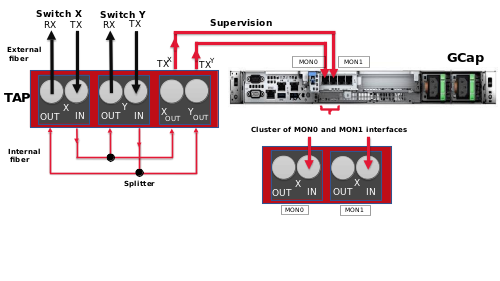
The GCap probe must read in a single flow; the network flow that has been captured in both directions:
An up-link
A down-link
Either the flows were captured and aggregated by an aggregator TAP
Or the flows were captured but not aggregated by a non-aggregating TAP
1.6.2.1. Capture mode with an aggregator TAP
1.6.2.2. Capture mode with a non-aggregating TAP: GCap mode with aggregation ("cluster")
1.6.2.2.1. Connection between TAP and GCap
An up-link, i.e. a TX link
A down-link, i.e. an RX link
Connected to IN of the X connector
The flow of the TX link is copied to OUT of the Y connector: this is connected to the RX link of the commutate Y physical link
The flow from the TX link is also copied to the Xout link which is sent to the input port of the GCap (IN link of the mon1 port)
Connected to IN of the Y connector
The flow of the TX link is copied to OUT of the X connector: this is connected to the RX link of the commutator X physical link
The flow from the TX link is also copied to the Yout link which is sent to the input port of the GCap (IN link of the mon0 port)
1.6.2.2.2. Aggregation of interfaces (or clustering)
1.6.2.3. Using and configuring interface aggregation
To implement interface aggregation, refer to Procedure to manage capture interface aggregation.
1.6.3. Transferring rules between GCenter and GCap: single-tenant vs. multi-tenant
For more information, please refer to Capture interfaces: single-tenant vs. multi-tenant.