1.3. Presentation of the GCap
Capturing and analyzing network traffic from TAPs
Reconstructing the files present in the analyzed flow (according to type and size parameters)
Carrying out an initial analysis
Generating alerts an/or metadata type events
Transmitting files / codes / events to the GCenter
1.3.1. Different server models
For more information, please refer to the section Mechanical characteristics of GCap.
1.3.2. Description of the GCap inputs / outputs
1.3.2.1. Example of a DELL R340 GCenter server
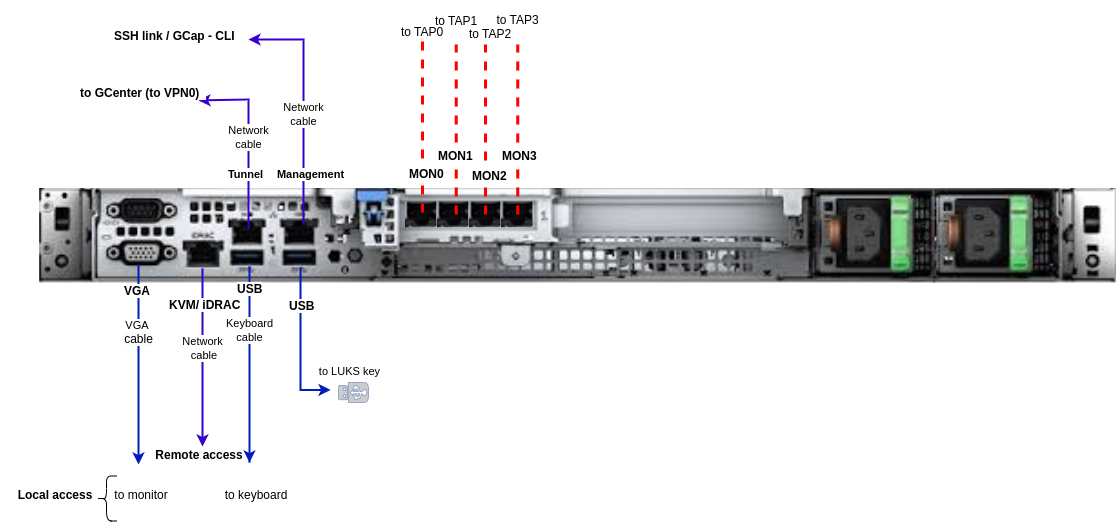
1.3.2.2. Example of a DELL R360 GCenter server
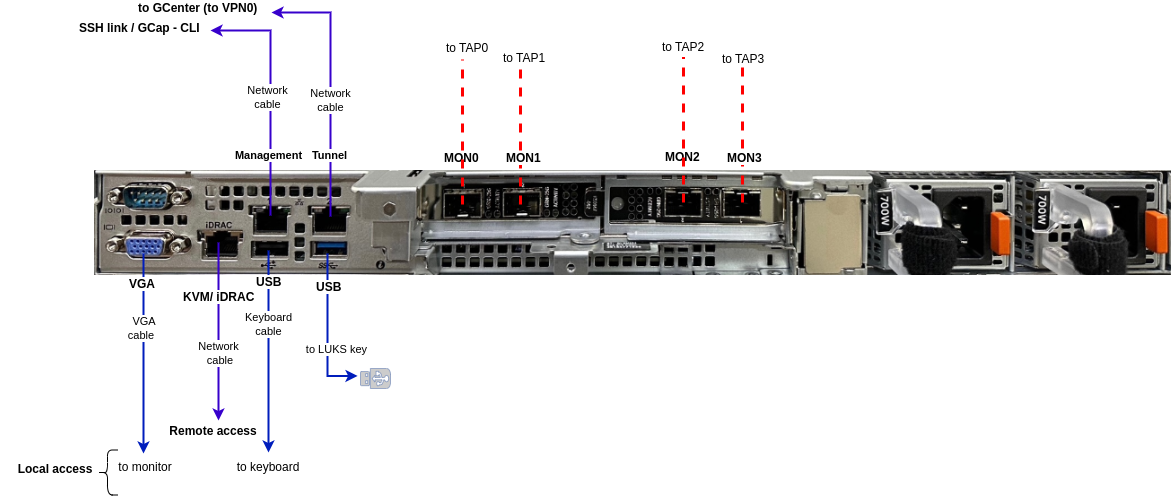
1.3.2.3. Example of a DELL R640 GCenter server
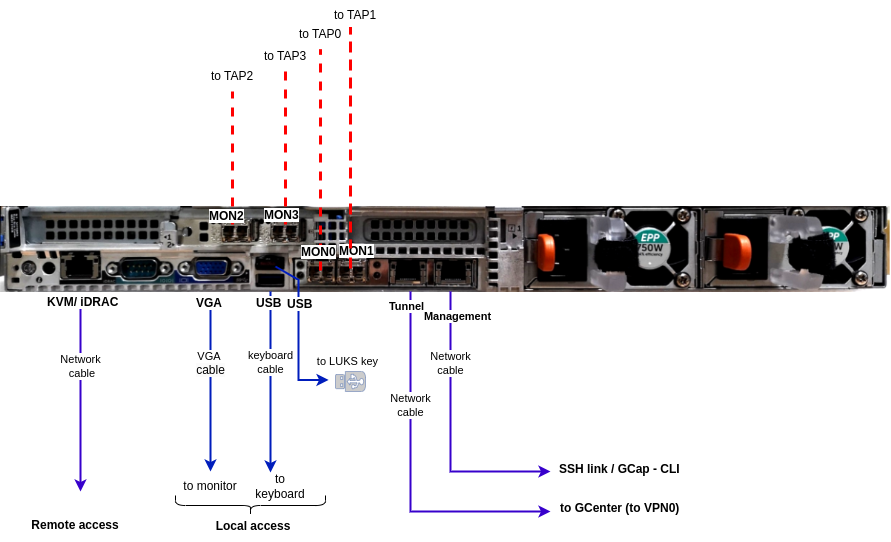
1.3.2.4. Example of a DELL R660 GCenter server
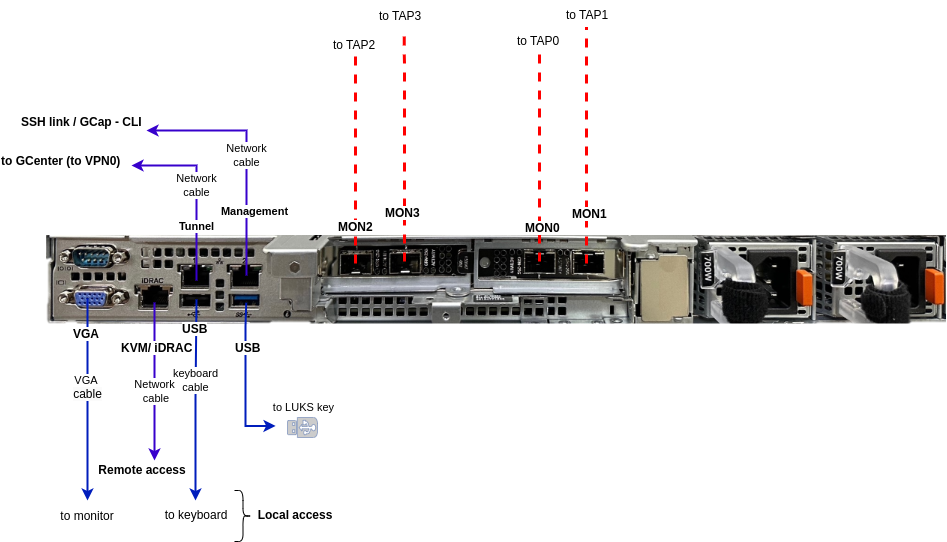
1.3.2.5. Example of a DELL R840 GCenter server
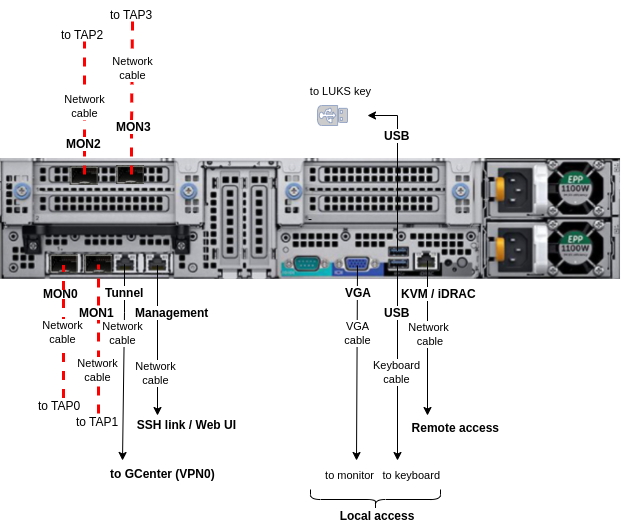
1.3.2.6. Description
Inputs/outputs |
Use cases |
|---|---|
USB and VGA connectors |
Directly access a keyboard and a monitor
This connection mode is deprecated in favor of KVM/IDRAC/XCC and should only be used as a last resort
|
USB connector |
Connection of the USB key allowing the decryption of disks (standard Linux Unified Key Setup) |
RJ-45 connector |
Access to the server's management and configuration interface |
RJ-45 connector |
In the double interface configuration: used for the Management and tunnel roles
In the single interface configuration: used for the Management role only
|
RJ-45 connector |
In the double interface configuration: used for the Dedicated VPN interface for the tunnel role
In the single interface configuration: not used
|
Two power supplies |
Redundant server power supplies |
Connectors SFP, SFP+, RJ-45 (
`MON1`, `MON0`, `MON3`, `MON2`) |
capture interfaces receive the flows from the TAPs
|
The GCap detection probe features:
Two RJ-45 connectors
`management`and`tunnel`RJ-45 and/or fiber connectors for monitoring
`mon0`(`capture`role)two power supplies.
1.3.2.7. Use of USB and VGA connectors
Connecting a keyboard and monitor enables direct access to the server's console interface.
Important
1.3.2.8. Access to the server's management and configuration interface
Access to this management interface is via HTTPS:
On a Dell server, this connector is called iDRAC. It is noted on the KVM/IDRAC GCap diagram
On a Lenovo server, this connector is called TSM. This connector can be identified by a wrench symbol on the bottom of it
1.3.2.9. Management and tunnel (`gcp0`) network interfaces
Important
Concept of role is introduced in the release 2.5.4.0.
These interfaces perform the following roles:
Role 1: called
`tunnel`, is the secure communication between the probe and GCenter through an IPSEC tunnel in order to:Escalate information such as files, alerts,metadata, and so on, derived from analyzing the monitored flows
Report information on the health of the probe to the GCenter
Control the probe - analysis rules, signatures, etc
Role 2 : called
`management`, is the remote administration through the SSH protocol with access :To the probe's command line interface (CLI)
To the graphical setup/configuration menu (deprecated)
1.3.2.9.1. Configuration of the `management` and `tunnel` network interfaces
For more information on these interfaces and their configuration, refer to Management overview of `Management` and `Tunnel` interfaces.
1.3.2.10. Capture interfaces
These interfaces receive:
The flows from the TAPs on the indicated interfaces (
`mon0`and`monx`) called`capture`The flow from previously recorded files (pcap files) on a dedicated
`monvirt`interface
Note
The number of capture interfaces varies depending on the specifications of each model.
1.3.2.10.1. Activating the capture `monx` interfaces
For more information, please refer to the paragraph Overview of managing the capture interfaces.
1.3.2.10.2. Aggregation of capture interfaces `monx`
For more information, please refer to Capture and capture interfaces `monx` between TAP and GCap: aggregation possibility.